> ## Documentation Index
> Fetch the complete documentation index at: https://docs-v2-staging.qbraid.com/llms.txt
> Use this file to discover all available pages before exploring further.
> ## Agent Instructions
> Prefer the qBraid CLI for programmatic platform actions: pip install 'qbraid-cli>=0.12', then run `qbraid configure` once with an API key from https://account.qbraid.com/account/api-keys.
> Always install the latest packages (pip install -U qbraid qbraid-cli); do not pin versions from memory. qbraid-cli below 0.12.0 is incompatible with the current API.
> Device IDs use the QRN format vendor:provider:type:name (e.g. qbraid:qbraid:sim:qir-sv, rigetti:rigetti:qpu:cepheus-1-108q). Legacy underscore IDs are deprecated.
> The REST API base URL is https://api-v2.qbraid.com/api/v1, authenticated with an X-API-Key header.
> Free simulators cost no credits; QPU and GPU jobs consume credits. Surface the estimated cost to the user before submitting a paid job.
> For account signup, API keys, credits, and end-to-end action recipes, see https://qbraid.com/llms.txt.
# GPUs
The qBraid Lab GPU server is tailored for researchers and developers requiring enhanced computational capabilities. This high-performance Lab instance allows users to leverage GPUs for accelerated circuit simulation, to explore quantum machine learning applications with GPU-enabled quantum gradients, and more.
## Available GPU Configurations
qBraid offers a broad range of NVIDIA GPU instances spanning Blackwell, Hopper, Ampere, and Ada Lovelace architectures:
- **NVIDIA B200 (Blackwell)** — Available in 1x, 2x, 4x, and 8x configurations
- **NVIDIA H200, H100 (Hopper)** — Available up to 8x for large-scale workloads
- **NVIDIA GH200 (Grace Hopper)** — Unified CPU-GPU superchip
- **NVIDIA A100 (Ampere)** — Available up to 8x
- **NVIDIA L4, L40S, RTX 4090, RTX 5090, RTX 6000 Ada** — Cost-effective options for development and inference
Billing is in credits/minute with rates shown in your account launcher. See [GPU pricing](https://docs-v2-staging.qbraid.com/v2/home/pricing#gpu-instances) for the full rate table.
## Launch a GPU Instance
From your [account dashboard](https://account.qbraid.com/dashboard), switch to the **On-Demand** tab. Each GPU profile shows its per-minute credit rate and a real-time availability indicator. Click **Launch** next to an available profile to start the instance.
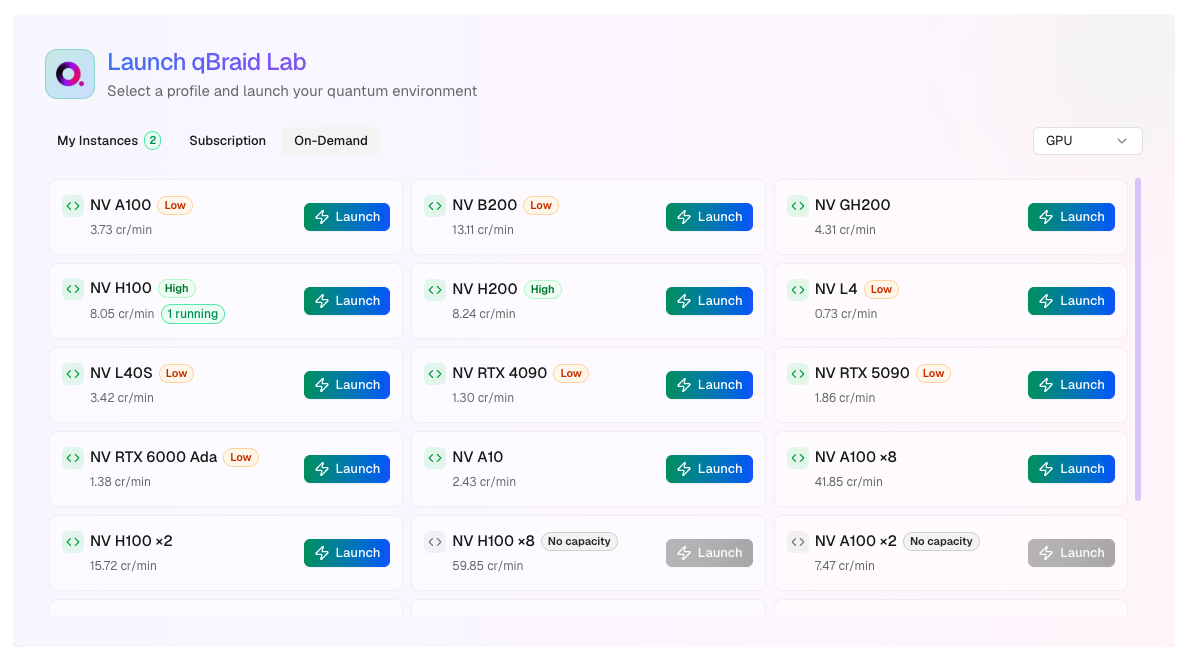 GPU instances may take a few minutes to provision as resources are allocated
on-demand.
Once the instance is running, you can open it in JupyterLab, VS Code, or connect via the built-in terminal — all from the browser. See [Accessing Your Instance](https://docs-v2-staging.qbraid.com/v2/lab/user-guide/on-demand-instances#accessing-your-instance) for details.
## Managing GPU Instances
GPU instances are on-demand instances with full start, stop, and terminate support:
- **Stop** — Pauses billing for compute while preserving your disk and files. Resume anytime.
- **Terminate** — Permanently deletes the instance and its data. Stops all billing.
See [On-Demand Instances](https://docs-v2-staging.qbraid.com/v2/lab/user-guide/on-demand-instances) for the complete lifecycle guide, including file persistence, billing details, and concurrent instance limits.
## GPU Utilities
Further information about your GPU hardware can be retrieved using the
[NVIDIA System Management Interface](https://developer.nvidia.com/nvidia-system-management-interface) (`nvidia-smi`) and
[NVIDIA CUDA Toolkit](https://developer.nvidia.com/cuda-toolkit) (`nvcc`) command line utilities.
Visit your [account page](https://account.qbraid.com/dashboard) to see the
full list of GPU options including real-time availability.
GPU instances may take a few minutes to provision as resources are allocated
on-demand.
Once the instance is running, you can open it in JupyterLab, VS Code, or connect via the built-in terminal — all from the browser. See [Accessing Your Instance](https://docs-v2-staging.qbraid.com/v2/lab/user-guide/on-demand-instances#accessing-your-instance) for details.
## Managing GPU Instances
GPU instances are on-demand instances with full start, stop, and terminate support:
- **Stop** — Pauses billing for compute while preserving your disk and files. Resume anytime.
- **Terminate** — Permanently deletes the instance and its data. Stops all billing.
See [On-Demand Instances](https://docs-v2-staging.qbraid.com/v2/lab/user-guide/on-demand-instances) for the complete lifecycle guide, including file persistence, billing details, and concurrent instance limits.
## GPU Utilities
Further information about your GPU hardware can be retrieved using the
[NVIDIA System Management Interface](https://developer.nvidia.com/nvidia-system-management-interface) (`nvidia-smi`) and
[NVIDIA CUDA Toolkit](https://developer.nvidia.com/cuda-toolkit) (`nvcc`) command line utilities.
Visit your [account page](https://account.qbraid.com/dashboard) to see the
full list of GPU options including real-time availability.

